











Shutterkit Check for Mac
- Free
- 4.5
- V1.0.1
Free Download for Mac
View an ad to download for free

- Farspeak Labs
- More programs (6)
Find out if a memory card is fake, slow or failing, without erasing it. Free
Requires macOS 14 Sonoma or later (Apple silicon and Intel).
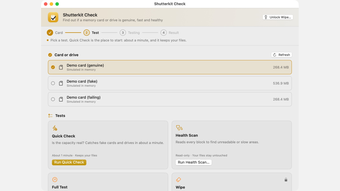
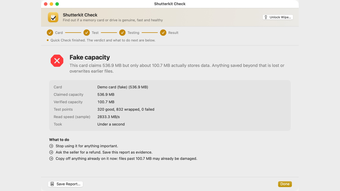
Check tests whether a memory card or drive really holds what its label says, how fast it actually writes, and whether it's starting to fail. Fake cards report far more space than they have and quietly lose whatever goes past it.
It has four tests. Quick Check writes small test blocks across the whole claimed capacity, reads them back and puts the original data back, in about a minute and without erasing the card. Health Scan reads every block to find unreadable or slow areas and never writes. Full Test checks every block for true capacity, bad areas and the speed the card really sustains, given as an SD speed class for cards or MB/s for drives. It erases the card. Wipe erases everything, then runs Recover's scanner over the card to show no file can be brought back, and gives you a certificate.
Results are a plain verdict (genuine, fake or failing) with what to do next, and can be saved as a PDF to send a seller. Tests that erase ask you to type a confirmation and offer to back the card up first, and Check won't write to your Mac's internal drives, a disk holding macOS or a disk image. It works with SD, SDHC, SDXC, microSD, CF and CFexpress cards, USB drives and SSDs. Check is free. Wipe is a paid unlock.
Price: Free. Wipe is a $9 in-app unlock (included in the Suite).
Loading…
App specs
Developer
- Farspeak Labs
- More programs (6)
License
Free
Version
1.0.1
Latest update
Platform
Mac
OS
Mac OS X
Language
English
Size
3.25 MB
Shutterkit Check for Mac
- Free
- 4.5
- V1.0.1
Free Download for Mac
View an ad to download for free
User reviews about Shutterkit Check
Have you tried Shutterkit Check? Be the first to leave your opinion!
Add reviewTop downloads Utilities & Tools for Mac
Top downloads Utilities & Tools for Mac
Top downloads Utilities & Tools for Mac
Related topics about Shutterkit Check
Latest articles

Assassin’s Creed Black Flag Resynced: New Game Plus hits PS5 next week

Apple Music now hides a playable iPod on its website: there’s Breakout too

Red Dead Online Halloween event is back: Dead of Night returns with 4x rewards

Clayface’s Aaron Paul cameo: why he appears only briefly

Apple iPhone Duo goes on sale: its first foldable hits stores
Laws concerning the use of this software vary from country to country. We do not encourage or condone the use of this program if it is in violation of these laws. Softonic may receive a referral fee if you click or buy any of the products featured here.